Professional content that is checked before it appears.
For trade and professional publishers and association media, where a wrong statement costs more than a late one. The checking suite runs on every pass, industry modules bring the checks for your field, and professional databases receive JATS.
- Approval by peopleNo text goes out without an editorial decision. The AI only makes suggestions.
- Print and onlinePrint edition, web portal, ePaper and newsletter from a single content base. Publishers without a print edition see no print section.
- A separate workspace per publisherSeparated at the database level, with full export and a deletion policy.
Today at the publisher
Checklists in WordCitations and facts looked up by handArticles reformatted for databasesAuthor declarations in a folderArchive only in the editors' heads
With AdpressaCheck, approve and publish in one workflow.
Sound familiar? This is what it's built for.
Typical pain points of trade and professional publishers and the capabilities Adpressa uses to solve them: first those of the core, then those of the matching modules. Every capability is already in the system, and none of it is a promise for later.
Errors only surface after publication
A fact is out of date, an image credit is missing, an author has not given her consent, and the readers notice before the editorial team does.
- Checking suite Required fields, image rights, duplicates, house style and spelling against your publisher's own dictionary, on every check run, with sign-off.
- Approval with a lock Open findings and missing author declarations block approval until they are resolved.
- Checklists before approval Checklists with mandatory items that must be completed before approval.
You see what is missing while writing, not in a letter to the editor.
Professional databases want their own format
The same article is prepared all over again for every database and every printer.
- JATS and ICML Articles as JATS for professional databases and as ICML for your own design program.
- Typesetting as PDF/X-4 The print edition is generated from print designs as PDF/X-4 for the printer, with ads placed in the layout and a print check.
- Interfaces Read access to published content for apps and partners via API key, signed webhooks on publication.
One approved article, every target format.
Nobody can find anything in the archive
Years of professional articles, but nobody knows what has already been written, and topics get repeated.
- Questions in your own words Archive search answers with citations from your own articles and shows gaps and follow-up topics.
- People, places and organizations The AI suggests who and what appears in an article. Only what you accept is created, and this becomes master data and topic pages.
Your back catalog works for the next issue.
Expert authors want to be asked and paid
Consents, rights and fees for external authors are scattered around, and nobody knows who has agreed to AI use.
- Authors with consents Authors are attached to the article together with their declarations, including on AI use. Without consent, the article stays locked for the AI.
- Author fees Agreements with a per-word, per-character or per-line rate and image fees, proposals generated from published pieces with a traceable count, credit note after approval by the editor-in-chief.
Every declaration and every credit note can be traced on the article.
Correct crop protection product information in the agricultural press
A product whose authorization has expired, a wrong application rate or a pre-harvest interval that is too short in an article can cost readers dearly, and nobody rereads all the old articles every time an authorization ends.
With the Agriculture, veterinary and food module- Check authorization Trade name, authorization number, crop and active ingredient are checked against the monthly updated data of the BVL (the German federal consumer protection office), and typos get a suggested correction.
- Quantities and intervals Application rates, pre-harvest intervals and conversions between liters, kilograms, quintals and livestock units are calculated and compared with the authorization.
- Update needed Published articles that mention a product whose authorization has ended or is about to end are put on a list, and the editorial team gets a notification.
The authorization is checked before a reader uses the product.
Standards and units that are right
Technical texts cite outdated editions of standards, units written incorrectly and manufacturer names without disclosure, and nobody checks this before printing.
With the Construction and engineering module- Standards references Format of the references and status of ISO standards: withdrawn editions along with their successors.
- Technical units kW instead of KW, W/(m²·K), the space before the unit and the decimal separator in the text.
- Manufacturers and brands Warnings about mentions that look like hidden advertising, before the article is approved.
Standards, units and disclosure are checked before approval, not criticized afterward.
Obligations and standards in educational publishing
Accessible e-books, texts that suit the grade level and proof of which competencies a textbook covers: each topic has its own checklist.
With the Education and textbooks module- Accessibility Alt text, headings, tables and links are checked, and so are the metadata for accessible e-books.
- Plain language and readability Plain-language rules and the target level for each grade appear as findings on the text.
- Curriculum links Competencies defined by the federal states are mapped to the articles, and the overview shows what is still open.
The check is part of the workflow, not a side list.
Obligations in the business and financial press
Price targets, security identifiers, conversions and the disclosure of conflicts of interest: each obligation has its own checklist.
With the Finance and business module- Identifiers and figures ISINs, WKNs and LEIs are calculated and checked against open registries, and conversions against the ECB rate.
- Investment recommendations An article with a price target or buy recommendation reaches approval only with the mandatory disclosures.
- Conflict-of-interest register If an article mentions a security that an author holds, the disclosure is added automatically.
The obligations are part of the workflow, not side lists.
Readers read, but you don't know who they are
Many readers arrive via search engines and leave again, and the publisher never learns who they are.
With the Leads and metering module- Free allowance per reader A number of free articles per period according to your rules, after which the paywall asks for registration.
- Contacts with consent Only people who have confirmed their address and agreed to its being passed on count as leads.
- Handover to your CRM Leads go through the outbox to your destinations, never without consent.
Anonymous visitors become contacts who have given their consent.
Reader service that lets nothing slip
Cancellations, delivery complaints and address changes arrive by phone, letter and email, and nobody knows what is still open or whether a deadline is running.
With the Reader Service module- Cases with deadlines and history Every request has a status, an owner, a deadline and a history, with reply templates and links to the subscription and delivery.
- Self-service in the portal Readers change their address, report vacation holds and delivery complaints, view invoices, and cancel using the legally required button.
- Campaigns with a legal basis Win-back and promotional campaigns go only to readers who have given consent or as permitted marketing to existing customers, with a suppression list and unsubscribe link.
Fewer follow-up inquiries, deadlines that are met, and canceled subscribers who come back.
Obligations in medical publishing
Advertising of medicinal products, content for healthcare professionals only, references and continuing education: each obligation has its own checklist.
With the Medicine module- Reference check References and citations are checked before the article is approved.
- Medicinal product advertising and healthcare professionals Mandatory information in ads and content that only healthcare professionals can see.
- Continuing education and DOI Continuing education with certificates and publication with a DOI.
The obligations are part of the workflow, not side lists.
Correct information in pharmacy and care media
Prescription requirements, mandatory texts in drug advertising and benefit amounts of long-term care insurance change, and hardly anyone rereads all articles after every change.
With the Pharmacy and care module- Prescription status Statements such as over-the-counter or prescription-only are checked against the official lists wherever the law is unambiguous.
- Mandatory text in advertising Ads for medicines reach approval only with the mandatory text required under the German Medicinal Products Advertising Act.
- Amounts and care levels Care allowance, relief amount and similar benefits are checked against the values valid on the publication date.
The information is checked before a reader looks it up.
Correct citations in legal and tax publishing
A wrong statute citation or outdated legal position costs credibility, and nobody rereads every old article after each change in the law.
With the Law and Tax module- Check statute citations Act, section and paragraph are checked against the official sources, and repealed provisions stand out.
- Check court decisions Court, case number and date are checked against the directory of the federal courts.
- Update needs After every change in the law, you know which published articles are affected.
The legal position is verified before a reader looks it up.
Connect the member magazine to the member directory
Member addresses live in the association software, the magazine is produced somewhere else, and the printer receives lists by hand.
With the Association Media module- Member directory with import CSV files from the association software are checked line by line, and new, changed and departed members are visible before the import is applied.
- Articles for members only Members log in with their membership number and a link sent to their email address on file, with no password.
- Address file and print run For each issue, the address file for the printer, filterable by regional chapter, with the print run and a record of when it was generated.
The magazine reaches exactly the members who receive it, and every figure can be traced.
The website already runs on WordPress
The website should stay as it is, but every article gets typed in there a second time.
With the WordPress add-on- Articles appear on WordPress Published articles go to your WordPress website with category, tags and featured image, and sending again later updates the same post.
- Quick import Existing content from WordPress, an export file or a feed comes in as drafts.
- Backfill You can also transfer articles that have already been published.
The newsroom writes once, and the WordPress website is still up to date.
What your website looks like
Adpressa delivers your publishing house's website itself. These example portals are real pages of the system with invented texts and example photos, selected for trade and professional publishers. You see the home page, sections and articles the way your readers would see them. The content is in German.
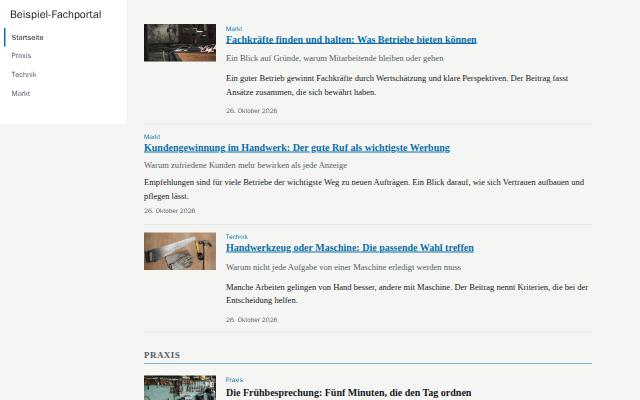 Trade portalFactual and clear: navigation as a column on the left, articles as a list one below the other, calm typography.View example
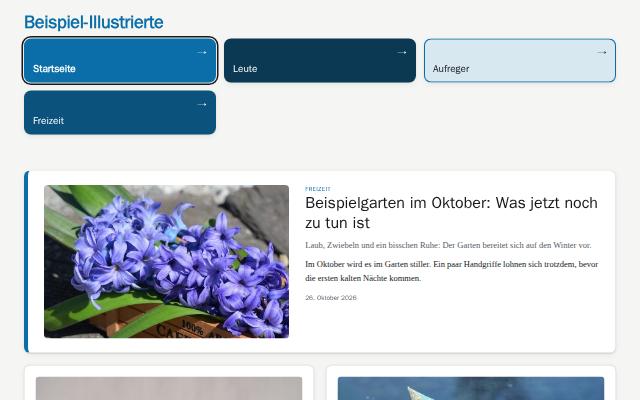 Tile portalLanding page for associations and service providers: the sections as large colored tiles, calm cards below.View example
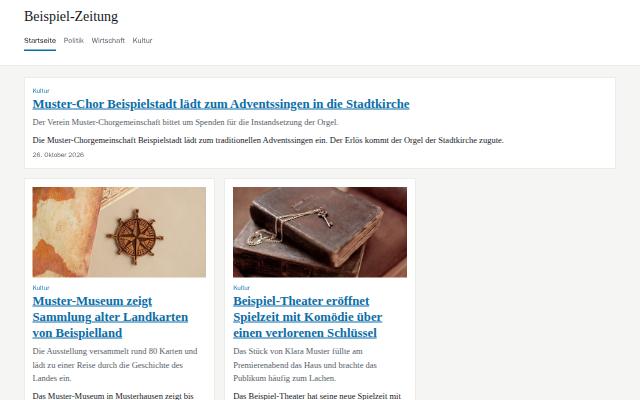 ClassicThe calm standard: light cards in a grid, section blocks with a colored line and a large lead story.View example
Do you recognize your publishing house?
We show you Adpressa using your own workflows: from the incoming text through checking and approval to the finished print edition, portal and newsletter. With your questions, without sales slides.
What every publisher gets, at no extra charge
The core includes what an editorial team needs for print and portal. Modules and add-ons cover special tasks.
- Articles and approvalVersions, authors with their consents, approval by people under a four-eyes rule, managing editor role, embargo, language versions, checklists before approval, turnaround metrics, notifications with escalation.
- Checking suiteCheck runs with findings, house style, duplicates, spelling and sign-off before approval.
- Planning and typesettingTopics, calendar, daily issues following a publication pattern, editorial duty roster, issue plan with page budget, on-screen page layout with an automatic draft as a suggestion, designed page layout with style templates, issue close-out with print approval, typesetting as PDF/X-4, ePaper for each issue, output as ICML and JATS.
- Web portal and readersWeb portal from a template for each publisher with preview, paywall with access tiers, reader accounts, breaking news on the home page, moderated comments and browser notifications, tests of headlines and images only with reader consent.
- NewsletterEditions built from published articles, consent checks, one-click unsubscribe, a log for every send.
- Ads, invoices and feesAd customers, price lists, orders and space in the issue, classified ads with payment in the portal, ads in the layout with print check and classified pages, family and obituary notices, invoices and e-invoices from the order and the subscription with partial payment and batch posting, fee credit notes for freelance authors.
- Subscriptions, address book and paymentSubscriptions with rate plans, annual billing run and address file, one address book for customers, subscribers and advertisers with duplicate checks, SEPA direct debit as a file for the bank, camt.053 bank statements with payment matching, and export for accounting in DATEV format.
- Intake and importTexts from Word, PDF, RTF, ODT, EPUB, DOC, text files and email, articles from source material and dictation, wire reports in NewsML-G2, NITF and ninjs with retraction and breaking-news handling, migration from WordPress, CSV and Excel with a check before execution.
- Media library, archive, podcastsImages with creator, license and rights expiry, media picker in the editor, cropping per channel, text in images and image search by meaning, semantic archive search, audio and video with feeds.
- AI with approvalEditorial assistant, your own instructions and style profiles per publisher, audience profiles, ad orders from email or document as a suggestion, titles and texts for search engines and social networks, social posts only after editorial approval, helpers in the editor, names of places, organizations and people from articles as master data, providers, and a log with the cost of every call.
- Publisher and accessTitles, sections, issues, users with roles, log-in through your identity provider, company data as a single source for invoices and the legal notice, address validation, and a checklist and sample issue to get started.
- Interfaces and operationsAPI keys, signed webhooks, forwarding through a single approval point, an outbox for everything that leaves the house, full export, logs, deletion policy, help and tickets.
What is not included
What the system cannot do, or what still has to be verified before launch, is listed here so that you know in advance.
- Not a layout application for every single pagePages are built from templates, in the column grid on screen and with style templates. If you design every page freely, stay with your layout application and import the articles as ICML.
- Printing and mailingYou receive the PDF/X-4 and the address file; the printer and the lettershop remain your partners.
- Ready-made legal texts for your portalYou supply the legal notice, terms and conditions and privacy policy for your portal. The company data shows which details are still missing for the legal notice.
- Typesetting software licenseTypesetting, page layout and ePaper render the PDF with the Prince typesetting software. The production license is still pending; until then, every page carries the watermark of the trial version.
- Native connection to every social networkWithout a connection to a network, an approved post goes as signed JSON to your recipient. Publishing through a channel distribution platform is available only as an add-on, and that will be offered only after it has been accepted.
- Integrations before acceptanceAdd-ons whose connection to a third-party service has not yet been accepted live are not in the modular kit and will be offered only afterward.
Switching with guidance from FHC+P
If you are switching from a legacy system and your own website, FHC+P, as operator of the platform and as IT service provider, handles the migration. We first look at what you have, and then give you a quote for the migration.
- Migration analysisWe review your legacy system, data volumes, existing websites, redirects and interfaces. The result is a fixed-price quote for the migration.€1,600.00 one-time, net, spread over the first year: about €133.33 per monthCredited if you order the migration.
- Portal launchThe standard layout is adapted to your brand: logo, colors, fonts and sections. This also includes your own domain with a certificate, the portal's legal notice and privacy pages with your texts, and acceptance together with you.€1,800.00 one-time, net, spread over the first year: €150.00 per month
- Migration and integrationWe migrate the data from your legacy system, connect existing portals, redirect old addresses and train your team. We prepare the quote after the analysis, as a fixed price or on a time-and-materials basis.After analysis
All amounts are net, plus statutory VAT. Fixed prices for setup services are spread over the twelve months of the first year; the migration after the analysis is a separate quote. What you need to provide and how acceptance works is set out in the General Terms and Conditions under setup services.
One base price per publisher for everything under “Included”, tiered by the number of active users. You add modules and add-ons when you need them. Make your selection and the total updates as you go.
Base price by size
| Tier | Active users | Per month | Setup |
|---|---|---|---|
| StarterSetup: creating the separate workspace with all users and roles. Portal launch and migration are separate services. | 1 to 3 | €490.00 | one-time €290.00 |
| EditorialSetup: creating the separate workspace with all users and roles. Portal launch and migration are separate services. | 4 to 10 | €890.00 | one-time €590.00 |
| PublisherSetup: creating the separate workspace with all users and roles. Portal launch and migration are separate services. | 11 to 25 | €1,490.00 | one-time €990.00 |
| Enterprise | 26 and up | on request | on request |
Active users with access are counted. Authors without access and blocked users do not count. How the tier changes as you grow is set out in the General Terms and Conditions.
Your price
All prices are net, in euros, plus statutory VAT. Prices are monthly amounts, annual prices are divided by 12, and one-time fees are spread over the twelve months of the first year.
12-month term, billed monthly, renewal for 12 months, termination with three months' notice before the end of the term.
The checks for your field are part of the industry modules. Choose the module for your field in the configurator. Starter is suggested as the tier. What counts is the number of your active users, and you can change the tier at any time.
Includes: setup of €290.00 spread over 12 months.
Without JavaScript, choose the tier, check or uncheck the boxes and select “Calculate total”. With JavaScript, the total updates instantly.
AI works alongside your editorial team, not instead of it
Drafts from source material and dictation, headlines, cuts, summaries, tags, copyediting, translations into language versions, titles and texts for search engines and social networks, ad orders from email, image crops and answers from the archive all arrive as suggestions. Acceptance happens in the editorial team. The editorial assistant takes questions and commands in your own words and creates suggestions that take effect only after you accept them.
Each publisher defines its own instructions and a style profile, and the editor-in-chief approves the instructions. Authors consent to AI use per article, and without their consent the article is left out. Every call is logged with provider, model, tokens and cost, and a monthly cost limit applies per publisher.
On labeling under Article 50 of the EU AI Act (Regulation (EU) 2024/1689): texts with AI involvement and AI images carry a label in the portal, and AI images also in print. The labels cannot be switched off. Whether they are sufficient in your case remains a matter for your own legal review.
Frequently asked questions
How does setup work?
Watch the demo, talk through the setup with us, then work through the checklist on the start page. A small, clearly marked sample issue is there for you to try things out. You import your own texts from Word and other files, WordPress, CSV or Excel.
Do we need a layout application for typesetting?
No. Pages are built from print designs and templates, in the column grid on screen or with style templates, and output as PDF/X-4. Your printer must accept PDF/X-4. If you prefer to keep typesetting in your own layout application, you receive the articles as ICML.
Does it work without a print edition?
Yes. A publisher without a print edition works with the web portal, newsletter and podcasts, and the interface then hides the print section.
Where is our data stored?
Each publisher has its own separate workspace, isolated from all others at the database level. You download the complete export of your publisher's data yourself, and the data deletion policy states retention periods for every type of data.
Who handles the migration from our legacy system?
On request, FHC+P, as operator and IT service provider. The migration analysis results in a quote for the migration and is credited if you commission it, provided the operator has set it up that way. What you need to provide is set out in the General Terms and Conditions.
How long does the contract run?
12-month term, billed monthly, renewal for 12 months, termination with three months' notice before the end of the term. The same applies to module and setup prices: one-time fees are spread over the twelve months of the first year.
Can we add modules later?
Yes. In your publisher's module catalog you see all modules with their prices and request them. The operator books the module, after which it is available to your publisher. A module added later runs until the end of the current term, and its setup fee is spread over twelve months from the booking date.
What does the AI cost?
Every call is logged with provider, model, tokens and cost in your publisher's log. A monthly cost limit applies, which you set in the AI settings.
Questions about the application?
We would be happy to show you Adpressa in a personal demo.