A new issue every day, online every hour.
For regional daily newspapers with local editions, wire stories and a newsroom that works in shifts. Adpressa sets up the issues for every publication day, takes in wire stories, lays out pages on screen and gets breaking news onto the portal.
- Approval by peopleNo text goes out without an editorial decision. The AI only makes suggestions.
- Print and onlinePrint edition, web portal, ePaper and newsletter from a single content base. Publishers without a print edition see no print section.
- A separate workspace per publisherSeparated at the database level, with full export and a deletion policy.
Today at the publisher
Wire stories in a separate programIssues created by hand each dayDuty roster in a spreadsheetPages laid out in a design programePaper from an outside vendorBreaking news by word of mouth
With AdpressaOne body of content for the daily issue, portal and ePaper.
Sound familiar? This is what it's built for.
Typical pain points of regional daily newspapers and the capabilities Adpressa uses to solve them: first those of the core, then those of the matching modules. Every capability is already in the system, and none of it is a promise for later.
An issue every day, often several
Local editions, holidays and deadlines live in people's heads and in spreadsheets, and whoever calls in sick takes that knowledge along.
- Publication patterns The system creates the issues for each day and edition from a pattern, with editorial, ad and print deadlines and the public holidays of your country.
- Deadlines in hours As an editorial or print deadline approaches, the control view shows the risk in hours.
- Issue close-out Proofreading pass, sign-off of the typesetting run and print approval, with the handover to the printer as an event for your integrations.
Today's issue and its deadlines are set before the editorial meeting begins.
Wire stories and breaking news without the chaos
The agency sends version after version, a recall gets lost in the stream, and a breaking story takes three phone calls.
- Wire stories in the inbox NewsML-G2, NITF and ninjs with updates, corrections and recalls. A new version of an article you have already taken over holds back its approval until a person decides.
- Breaking news Urgent agency alerts sit at the top of the queue. The editor-in-chief and the managing editor pin the approved article to the portal's home page and notify readers who have opted in.
- Managing editor A role of its own with the right to publish. The four-eyes rule applies to it as well.
Every version is traceable, and nothing is published without a decision by the editorial team.
Pages through to the press start
Toward evening every page is built in a design program, and when a story runs too long, the phones start ringing.
- Page layout on screen Frames in the column grid, text flowing across columns and pages, image cropping and a proof as PDF.
- Automatic page layout as a suggestion Draft pages built from templates for each section, with measurement and a suggested cut. The editorial team compares, accepts or discards.
- Ads in typesetting Booked ads on the page plan with a print check and warnings about conflicts, family and obituary notices with a proof.
The page is built in the same system in which the text was written.
Shift scheduling without the spreadsheet
Early, late and weekend shifts sit in one file, vacation swaps go by email, and nobody checks whether rest periods are long enough.
- Duty roster Shifts and on-call duty by team and day, vacation and shift swaps with approval.
- Working-time check under the German Working Time Act Warnings about rest periods that are too short (§ 5 para. 1 ArbZG) and working days that are too long (§ 3 ArbZG), calculated from the roster. The system does not invent collective-agreement rules.
- Comparison with the issue plan The roster shows whether staffing on each day matches the issues planned.
The roster lives in one place, and violations are caught before the shift starts.
The ePaper comes from an outside vendor
The ePaper is produced elsewhere, costs extra and is not properly linked to the subscriber on the portal.
- An ePaper for every issue Built from the print PDF and the article texts, with zoom, page overview, reading mode, bookmarks and archive, on the portal and as an app, access by tier with a preview of the first pages.
The ePaper is ready as soon as print approval is given, for the right readers.
What sits at the newsstand is planned and settled
Copies supplied and returns sit in the wholesalers' spreadsheets, settlements are recalculated by hand, and the next print run is decided by gut feeling.
With the Single-copy sales module, preselected in the configurator- Points of sale and territories Wholesalers, station bookstores, newsstands and retailers are master records with a territory and route. Name and address are stored only in the address book.
- Copies supplied, returns and settlement For each issue and point of sale you record copies supplied and returns, by hand or from a spreadsheet. The system issues the invoice for copies supplied and the credit note for returns in the invoicing package, with a number.
- Demand as a suggestion From the most recent issues, the system calculates a suggestion for the next supply, with a visible rationale and a seasonal note. You decide.
Fewer returns, less manual work and a settlement that matches every delivery.
Reader service that lets nothing slip
Cancellations, delivery complaints and address changes arrive by phone, letter and email, and nobody knows what is still open or whether a deadline is running.
With the Reader service module, preselected in the configurator- Cases with deadlines and history Every request has a status, an owner, a deadline and a history, with reply templates and links to the subscription and delivery.
- Self-service in the portal Readers change their address, report vacation holds and delivery complaints, view invoices, and cancel using the legally required button.
- Campaigns with a legal basis Win-back and promotional campaigns go only to readers who have given consent or as permitted marketing to existing customers, with a suppression list and unsubscribe link.
Fewer follow-up inquiries, deadlines that are met, and canceled subscribers who come back.
Close to your readers' hometowns
Local reports, club announcements and events come in through many channels, and the portal lacks the pages where readers can find their own town.
With the Local and Regional module, preselected in the configurator- Circulation area and town pages Municipalities from the official directory, articles tied to a location, and one page per town in the portal.
- Reviewed submissions Readers and local clubs send in texts and photos, the editorial team accepts or rejects them, and the article draft is created automatically.
- Events calendar Events with recurrence, submission by organizers with approval, subscribable calendars and structured data for search engines.
Local content follows a single path from submission to town page.
Obituary notices that stay online
The printed obituary notice is forgotten after a day, and the portal has no quiet place for a memorial page.
With the Obituary portal module, preselected in the configurator- Memorial page and condolence book The notice goes online with service dates, visitors write in the condolence book and light candles, and you approve every entry.
- Funeral directors and family members Funeral directors submit notices through their own link, and family members hide entries or hide the page.
- Duration and additional revenue The page goes offline once its term ends, and extensions and highlighting are line items for billing.
The obituary notice becomes a second, dignified presence that earns its own revenue.
The paper gets delivered, and you know where
Routes, vacation holds and delivery complaints live in lists and on slips of paper, and the carrier hears about changes too late.
With the Delivery module, preselected in the configurator- Districts, routes and carriers Every subscription has a delivery type and a route with a fixed stop order, and the suggestion is derived from the postal code.
- Vacation holds, moves and delivery complaints Every report is a case with a status and history, a move changes the subscription address on the effective date, and the redelivery appears on the route list.
- List for the carrier A private link shows the carrier today's route list on a phone or as a PDF, with no account and no location data.
Fewer calls about undelivered papers, and the carrier always has the current status.
Readers read, but you don't know who they are
Many readers arrive via search engines and leave again, and the publisher never learns who they are.
With the Leads and metering module- Free allowance per reader A number of free articles per period according to your rules, after which the paywall asks for registration.
- Contacts with consent Only people who have confirmed their address and agreed to its being passed on count as leads.
- Handover to your CRM Leads go through the outbox to your destinations, never without consent.
Anonymous visitors become contacts who have given their consent.
Open ad slots earn nothing
The ad sales team sells online ads by hand, many slots stay empty or show house ads, and small budgets are not worth preparing a quote for.
With the Ad Marketplace module- An ad marketplace across many publishers Vetted advertisers book your open slots themselves and place bids. Your own sales always take priority.
- Your rules You choose websites, slots and minimum prices, approve creatives manually or automatically, and block industries or advertisers.
- Effortless billing The platform bills the advertisers and issues you a credit note every month. Impressions are counted without cookies and with a bot filter.
Empty ad slots turn into revenue, without additional sales effort.
What your website looks like
Adpressa delivers your publishing house's website itself. These example portals are real pages of the system with invented texts and example photos, selected for regional daily newspapers. You see the home page, sections and articles the way your readers would see them. The content is in German.
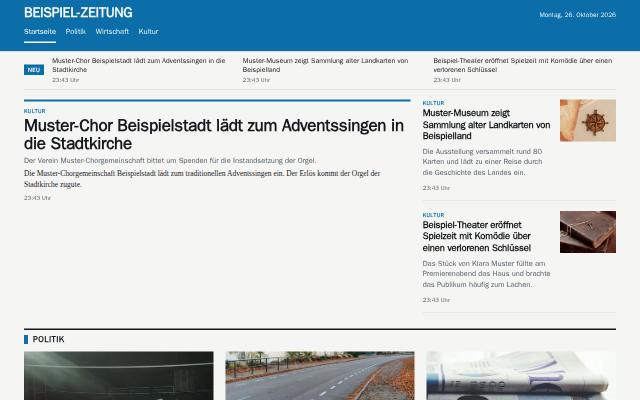 NewsThe structure of a news site: a strip of the latest items, a large lead story with a side column and an image grid for each section.View example
 TabloidLoud and bold: huge headlines, colored labels and several large lead stories one below the other.View example
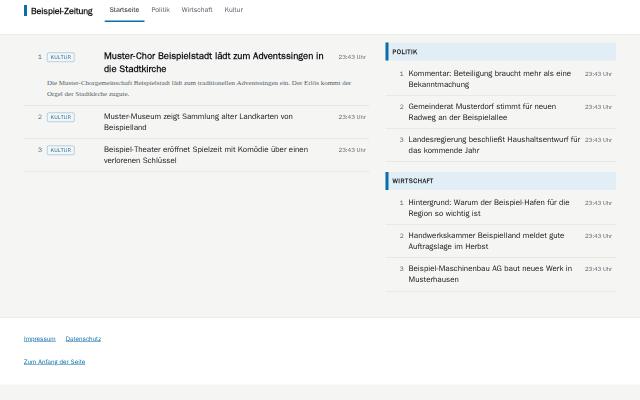 CompactQuick to scan: numbered headlines in dense lines, the section as a small label and the time on the right.View example
Do you recognize your publishing house?
We show you Adpressa using your own workflows: from the incoming text through checking and approval to the finished print edition, portal and newsletter. With your questions, without sales slides.
What every publisher gets, at no extra charge
The core includes what an editorial team needs for print and portal. Modules and add-ons cover special tasks.
- Articles and approvalVersions, authors with their consents, approval by people under a four-eyes rule, managing editor role, embargo, language versions, checklists before approval, turnaround metrics, notifications with escalation.
- Checking suiteCheck runs with findings, house style, duplicates, spelling and sign-off before approval.
- Planning and typesettingTopics, calendar, daily issues following a publication pattern, editorial duty roster, issue plan with page budget, on-screen page layout with an automatic draft as a suggestion, designed page layout with style templates, issue close-out with print approval, typesetting as PDF/X-4, ePaper for each issue, output as ICML and JATS.
- Web portal and readersWeb portal from a template for each publisher with preview, paywall with access tiers, reader accounts, breaking news on the home page, moderated comments and browser notifications, tests of headlines and images only with reader consent.
- NewsletterEditions built from published articles, consent checks, one-click unsubscribe, a log for every send.
- Ads, invoices and feesAd customers, price lists, orders and space in the issue, classified ads with payment in the portal, ads in the layout with print check and classified pages, family and obituary notices, invoices and e-invoices from the order and the subscription with partial payment and batch posting, fee credit notes for freelance authors.
- Subscriptions, address book and paymentSubscriptions with rate plans, annual billing run and address file, one address book for customers, subscribers and advertisers with duplicate checks, SEPA direct debit as a file for the bank, camt.053 bank statements with payment matching, and export for accounting in DATEV format.
- Intake and importTexts from Word, PDF, RTF, ODT, EPUB, DOC, text files and email, articles from source material and dictation, wire reports in NewsML-G2, NITF and ninjs with retraction and breaking-news handling, migration from WordPress, CSV and Excel with a check before execution.
- Media library, archive, podcastsImages with creator, license and rights expiry, media picker in the editor, cropping per channel, text in images and image search by meaning, semantic archive search, audio and video with feeds.
- AI with approvalEditorial assistant, your own instructions and style profiles per publisher, audience profiles, ad orders from email or document as a suggestion, titles and texts for search engines and social networks, social posts only after editorial approval, helpers in the editor, names of places, organizations and people from articles as master data, providers, and a log with the cost of every call.
- Publisher and accessTitles, sections, issues, users with roles, log-in through your identity provider, company data as a single source for invoices and the legal notice, address validation, and a checklist and sample issue to get started.
- Interfaces and operationsAPI keys, signed webhooks, forwarding through a single approval point, an outbox for everything that leaves the house, full export, logs, deletion policy, help and tickets.
What is not included
What the system cannot do, or what still has to be verified before launch, is listed here so that you know in advance.
- Not a layout application for every single pagePages are built from templates, in the column grid on screen and with style templates. If you design every page freely, stay with your layout application and import the articles as ICML.
- Printing and mailingYou receive the PDF/X-4 and the address file; the printer and the lettershop remain your partners.
- Ready-made legal texts for your portalYou supply the legal notice, terms and conditions and privacy policy for your portal. The company data shows which details are still missing for the legal notice.
- Typesetting software licenseTypesetting, page layout and ePaper render the PDF with the Prince typesetting software. The production license is still pending; until then, every page carries the watermark of the trial version.
- Native connection to every social networkWithout a connection to a network, an approved post goes as signed JSON to your recipient. Publishing through a channel distribution platform is available only as an add-on, and that will be offered only after it has been accepted.
- Integrations before acceptanceAdd-ons whose connection to a third-party service has not yet been accepted live are not in the modular kit and will be offered only afterward.
- Connection to the print control systemPrint approval is reported as an event to your connections, and the printer receives the PDF/X-4. There is no connection to the printer's control system because the manufacturers' formats are not available.
- Verified feed from a news agencyWire reports are read according to the public IPTC specifications and tested with self-generated sample files, not against a real dpa feed. The connection to your agency's feed must be verified together before launch.
- Time savings from automatic page layoutAutomatic page layout is a draft that the editorial team reviews. How much time it saves per page has not been measured; the target of ten minutes per page is not substantiated.
- Reporting formats of press wholesalersSupply and returns for single-copy sales come in as CSV with free column mapping. Fixed wholesaler formats are not built in because no reliable specification is available.
- Circulation reportingThe ePaper counts views per issue without any personal data. A procedure for reporting circulation has not been built.
Switching with guidance from FHC+P
If you are switching from a legacy system and your own website, FHC+P, as operator of the platform and as IT service provider, handles the migration. We first look at what you have, and then give you a quote for the migration.
- Migration analysisWe review your legacy system, data volumes, existing websites, redirects and interfaces. The result is a fixed-price quote for the migration.€1,600.00 one-time, net, spread over the first year: about €133.33 per monthCredited if you order the migration.
- Portal launchThe standard layout is adapted to your brand: logo, colors, fonts and sections. This also includes your own domain with a certificate, the portal's legal notice and privacy pages with your texts, and acceptance together with you.€1,800.00 one-time, net, spread over the first year: €150.00 per month
- Migration and integrationWe migrate the data from your legacy system, connect existing portals, redirect old addresses and train your team. We prepare the quote after the analysis, as a fixed price or on a time-and-materials basis.After analysis
All amounts are net, plus statutory VAT. Fixed prices for setup services are spread over the twelve months of the first year; the migration after the analysis is a separate quote. What you need to provide and how acceptance works is set out in the General Terms and Conditions under setup services.
One base price per publisher for everything under “Included”, tiered by the number of active users. You add modules and add-ons when you need them. Make your selection and the total updates as you go.
Base price by size
| Tier | Active users | Per month | Setup |
|---|---|---|---|
| StarterSetup: creating the separate workspace with all users and roles. Portal launch and migration are separate services. | 1 to 3 | €490.00 | one-time €290.00 |
| EditorialSetup: creating the separate workspace with all users and roles. Portal launch and migration are separate services. | 4 to 10 | €890.00 | one-time €590.00 |
| PublisherSetup: creating the separate workspace with all users and roles. Portal launch and migration are separate services. | 11 to 25 | €1,490.00 | one-time €990.00 |
| Enterprise | 26 and up | on request | on request |
Active users with access are counted. Authors without access and blocked users do not count. How the tier changes as you grow is set out in the General Terms and Conditions.
Your price
All prices are net, in euros, plus statutory VAT. Prices are monthly amounts, annual prices are divided by 12, and one-time fees are spread over the twelve months of the first year.
12-month term, billed monthly, renewal for 12 months, termination with three months' notice before the end of the term.
The modules that regional daily newspapers usually need are preselected. You can change the selection at any time. The suggested tier is Publisher. What counts is your number of active users, and you can change the tier at any time.
Includes: setup of €1,290.00 spread over 12 months.
On request, not included in the total: Single-copy sales, Reader service, Delivery.
Without JavaScript, choose the tier, check or uncheck the boxes and select “Calculate total”. With JavaScript, the total updates instantly.
AI works alongside your editorial team, not instead of it
Drafts from source material and dictation, headlines, cuts, summaries, tags, copyediting, translations into language versions, titles and texts for search engines and social networks, ad orders from email, image crops and answers from the archive all arrive as suggestions. Acceptance happens in the editorial team. The editorial assistant takes questions and commands in your own words and creates suggestions that take effect only after you accept them.
Each publisher defines its own instructions and a style profile, and the editor-in-chief approves the instructions. Authors consent to AI use per article, and without their consent the article is left out. Every call is logged with provider, model, tokens and cost, and a monthly cost limit applies per publisher.
On labeling under Article 50 of the EU AI Act (Regulation (EU) 2024/1689): texts with AI involvement and AI images carry a label in the portal, and AI images also in print. The labels cannot be switched off. Whether they are sufficient in your case remains a matter for your own legal review.
Frequently asked questions
How does setup work?
Watch the demo, talk through the setup with us, then work through the checklist on the start page. A small, clearly marked sample issue is there for you to try things out. You import your own texts from Word and other files, WordPress, CSV or Excel.
Do we need a layout application for typesetting?
No. Pages are built from print designs and templates, in the column grid on screen or with style templates, and output as PDF/X-4. Your printer must accept PDF/X-4. If you prefer to keep typesetting in your own layout application, you receive the articles as ICML.
Does it work without a print edition?
Yes. A publisher without a print edition works with the web portal, newsletter and podcasts, and the interface then hides the print section.
Where is our data stored?
Each publisher has its own separate workspace, isolated from all others at the database level. You download the complete export of your publisher's data yourself, and the data deletion policy states retention periods for every type of data.
Who handles the migration from our legacy system?
On request, FHC+P, as operator and IT service provider. The migration analysis results in a quote for the migration and is credited if you commission it, provided the operator has set it up that way. What you need to provide is set out in the General Terms and Conditions.
How long does the contract run?
12-month term, billed monthly, renewal for 12 months, termination with three months' notice before the end of the term. The same applies to module and setup prices: one-time fees are spread over the twelve months of the first year.
Can we add modules later?
Yes. In your publisher's module catalog you see all modules with their prices and request them. The operator books the module, after which it is available to your publisher. A module added later runs until the end of the current term, and its setup fee is spread over twelve months from the booking date.
What does the AI cost?
Every call is logged with provider, model, tokens and cost in your publisher's log. A monthly cost limit applies, which you set in the AI settings.
Questions about the application?
We would be happy to show you Adpressa in a personal demo.